PersonalBusiness
About the NRMAFuel pricesSupportAccessibilityAccessibility
NRMA Roadside, Travel and Rewards
  • About the NRMA
  • Fuel prices
  • Support
  • Accessibility
Electric vehicles
Charging an EV
EV Charger Help

Support for EV Charging

All you need to know to start your charging session in just a few steps.
man and woman at ev charging station

This page provides detailed instructions for charging your EV at NRMA Electric stations, including how to start a session using the My NRMA app, Tap & Pay and RFID cards.

For on-site assistance or technical support at any NRMA Electric charger, please contact 1300 233 544.

Charging via app

Charging via app instructions
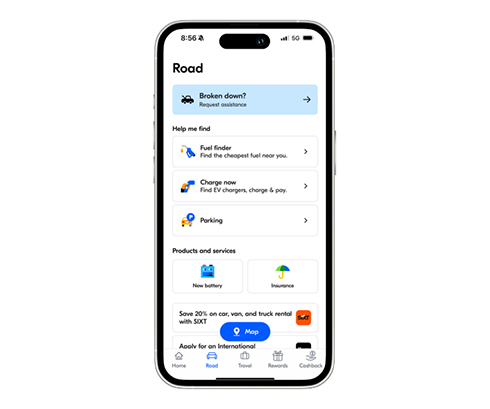
 

Step 1

  • Plug in vehicle
  • Open app and go to EV charging
 
step 1 


Step 2

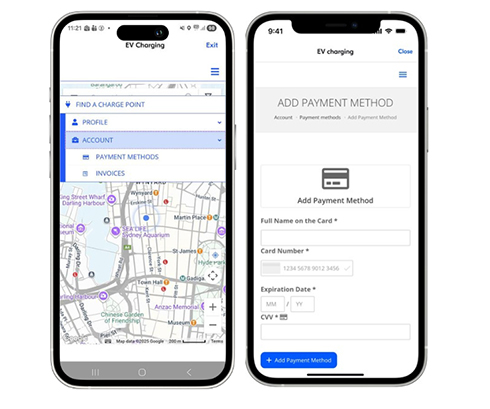
  • Go to Menu (three bars on top right), Account and then select payment methods
  • Please note: We are currently not able to use any existing payment methods in the my NRMA app for EV charging. Therefore, please enter your payment details for EV charging in the EV charging part of the app.
 
ev charging app step 2 


Step 3

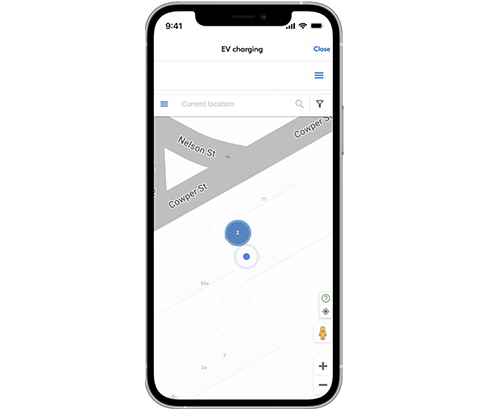
  • Select location
 
ev charging app step 3 


Step 4

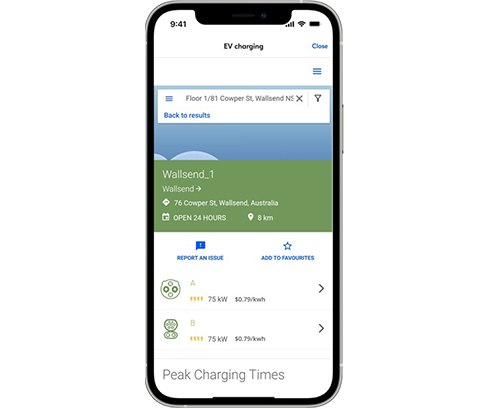
  • Select charger
  • Select Connector
 
ev charging app step 4 


Step 5

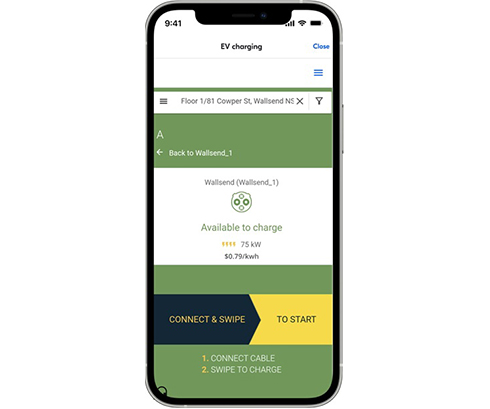
  • Double check details
  • Swipe to start charging
 
ev charging app step 5 


Note, the NRMA EV Network now has idle fees once charging stops. The fee is $1 per minute after a 10-minute grace period. Please move your vehicle after it has stopped charging.

NRMA chargers are also available on the Chargefox app. Please reach out to Chargefox for charging on their app.

Tap & Pay

Tap & Pay instructions

Step 1

  • Plug in your vehicle (Plug in)
  • Wait for 20s for communication

Step 2

  • Tap credit card or use phone pay on card reader to start charging (Tap on)
  • For receipt scan the QR code on the card reader and follow steps

Step 3

  • Stop Charging
  • Tap credit card or use phone pay on card reader (Tap off and unplug)

RFID cards

RFID card instructions

Please see instructions below for using RFID cards depending on charger type:

  • 1. Plug in vehicle
  • 2. Wait until connection to car is established (should only be couple of seconds max)
  • 3. Select plug on the screen
  • 4. Swipe RFID card on the RFID reader on the charger
  • 5. To stop charge: Select plug again and swipe RFID card again on the charger.
Help
Support
Manage my account
Renew membership
Request roadside assistance
Products and services
Membership
Roadside assistance
Car battery replacement
Car insurance
Roadside assistance for business
Electric vehicle charging
Driving lessons
Travel insurance
International driving permit
Quick links
Join My NRMA Rewards
Find offers and discounts
My NRMA app
Cars and driving
Buying a car
Fuel finder
Trip planner
SIXT Car and Truck Rental
NRMA Parks and Resorts
My NRMA Rewards
Travel and holidays
Food and dining
Automotive
Experiences and attractions
Shopping and lifestyle
Cashback
Open Road
About us
Who we are
Our community impact
Careers
Media
Download the app
download on the apple store
Get it on google play
Sitemap
General conditions
Privacy policy
Cookie policy
Facebook
Instagram
x.com
youtube
linkedin
©️2026 National Roads and Motorists’ Association Limited. ABN 77 000 010 506.