PersonalBusiness
About the NRMAFuel pricesSupportAccessibilityAccessibility
NRMA Roadside, Travel and Rewards
  • About the NRMA
  • Fuel prices
  • Support
  • Accessibility
Support
Renewing NRMA Membership via Post Billpay

Using Post Billpay to renew membership

For every additional vehicle you add to your membership,To renew your membership in person at any participating Australian Post Office with Post Billpay, you'll need the following: Post Billpay barcode: Found on your renewal statement, follow the steps below to download. Payment method: Take note of the amount due and bring either cash, cheque, EFTPOS, credit card or debit card.save 20% on the first year of Roadside Assistance. T&C's apply.

Follow the steps below to Pay via Post Billpay

Slide 1
Sign in to your online account
Slide 2
Once you're signed in, click on "Add another vehicle and save 20%
Slide 3
Select the level of cover which suits you
Slide 4
Add the details of the vehicle you would like covered and any add-ons on the next screen
1/4

Pay via Post Billpay

Step 1: Sign in to your online account at mynrma.com.au/signin - if you haven't signed in before, you'll have to register for an online account.

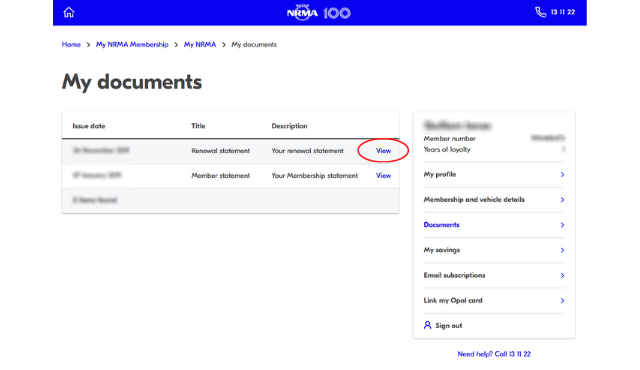
Step 2: Navigate to your documents - this is where you'll find a digital copy of all your renewal statements.

Step 3: Click on "View" next to your most recent renewal statement, found at the top of your documents list. This will download the statement to your device.

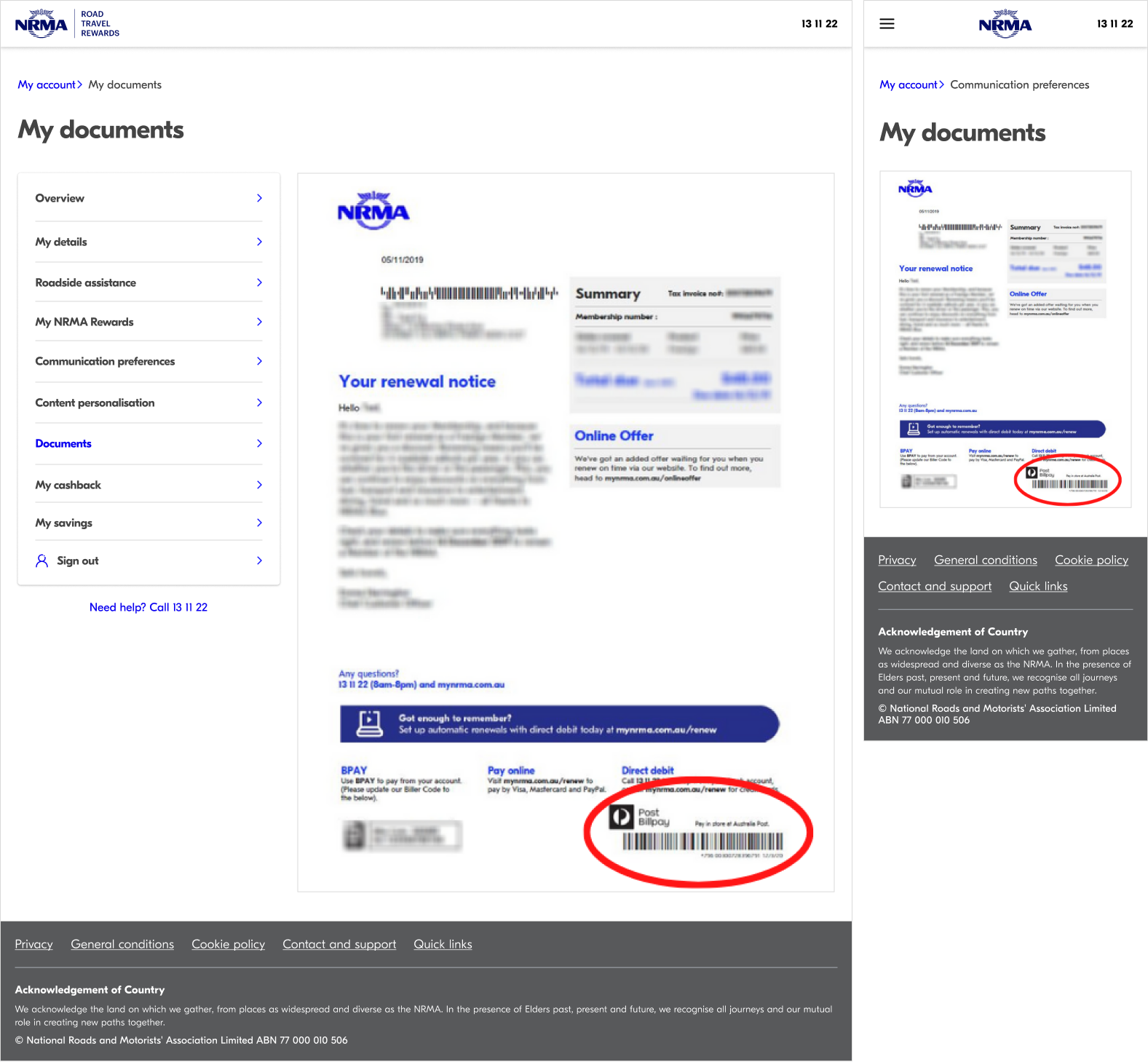
Step 4: Once downloaded, open your renewal statement document and find the Post Billpay barcode at the bottom of page 1.

You might also like

Hand on fuel pump with a graphic overlay of a bar chart graphic
Latest news
Latest news
Hand on fuel pump with a graphic overlay of a bar chart graphic
Latest news
Latest news
My NRMA app on phone in hands
My NRMA App
My NRMA App
My NRMA app on phone in hands
My NRMA App
My NRMA App
My NRMA
My NRMA
Membership FAQs
Membership FAQs
My NRMA
My NRMA
Membership FAQs
Membership FAQs
NRMA Roadside Assistance FAQs
Roadside Assistance FAQs
NRMA Roadside Assistance FAQs
Roadside Assistance FAQs
Help
Support
Manage my account
Renew membership
Request roadside assistance
Products and services
Membership
Roadside assistance
Car battery replacement
Car insurance
Roadside assistance for business
Electric vehicle charging
Driving lessons
Travel insurance
International driving permit
Quick links
Join My NRMA Rewards
Find offers and discounts
My NRMA app
Cars and driving
Buying a car
Fuel finder
Trip planner
SIXT Car and Truck Rental
NRMA Parks and Resorts
My NRMA Rewards
Travel and holidays
Food and dining
Automotive
Experiences and attractions
Shopping and lifestyle
Cashback
Open Road
About us
Who we are
Our community impact
Careers
Media
Download the app
download on the apple store
Get it on google play
Sitemap
General conditions
Privacy policy
Cookie policy
Facebook
Instagram
x.com
youtube
linkedin
©️2026 National Roads and Motorists’ Association Limited. ABN 77 000 010 506.